

In-car Electronics
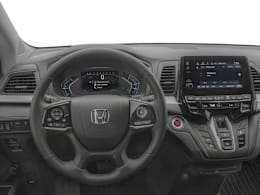
Infotainment system (audio, GPS, phone), rear entertainment system, backup or other camera/sensors, head-up display.
What Owners Say
""Screen went blank, took to dealer, repaired. Apparently a fuse link went bad""
Anonymous, NY (2018 Honda Odyssey EX-L 3.5-L V6)"Dashboard info became unavailable requiring replacement of camera and other controls to recover dashboard information."
Anonymous, FL (2018 Honda Odyssey EX-L 3.5-L V6)""Continues to have the same issues (radio unavailable, info system not functional and restarting at random). Have had Honda service several times (done at no charge) and many replacement components (including battery, CD/DVD player and rear cameras) have been done, including software updates.""
Anonymous, ON (2018 Honda Odyssey Touring 3.5-L V6)"It does not update easily, it is a long process involving an thumb drive to get an GPS update and it takes almost an hour that you have to leave the van on and running"
Anonymous A., AZ (2018 Honda Odyssey EX-L 3.5-L V6)"door electronic control"
Anonymous A., NC (2018 Honda Odyssey LX 3.5-L V6)"There would be a clicking noise coming from the speakers even when the rear entertainment system wasn't being used. I replaced the control box and it has been fine since."
Anonymous, NC (2018 Honda Odyssey Touring 3.5-L V6)"The steering wheel controls work on a hit or miss basis only. Sometimes it just freezes and controls nothing. Other times it works fine. Honda is unable to provide a fix."
Anonymous, GA (2018 Honda Odyssey Touring Elite 3.5-L V6)
""Sometimes, Android Auto will cause the screen to black out or stop functioning, requiring you to stop the vehicle, turn it off, open and close the door, and then restart the van. Occasionally, this procedure must be repeated several times, and even then, it may not resolve the issue. In some cases, it can take up to a day for the problem to resolve itself randomly. Alternatively, performing a reset of the head unit by holding down the power button until it resets can sometimes correct the issue, after which Android Auto typically operates normally for a while. Additionally, it is necessary to place your phone in the cup holder with the USB connect facing up to prevent the USB cord from being disturbed. If the cord is touched, Android Auto may lose connection and reset. However, I have observed this behavior in other vehicles as well, using different phones and different cords, so it appears that this issue is not exclusive to the Odyssey.""
Anonymous A., VA (2018 Honda Odyssey Touring Elite 3.5-L V6)